TablePlus Review: Powerful Yet Not Perfect Database Tool You’ll Love
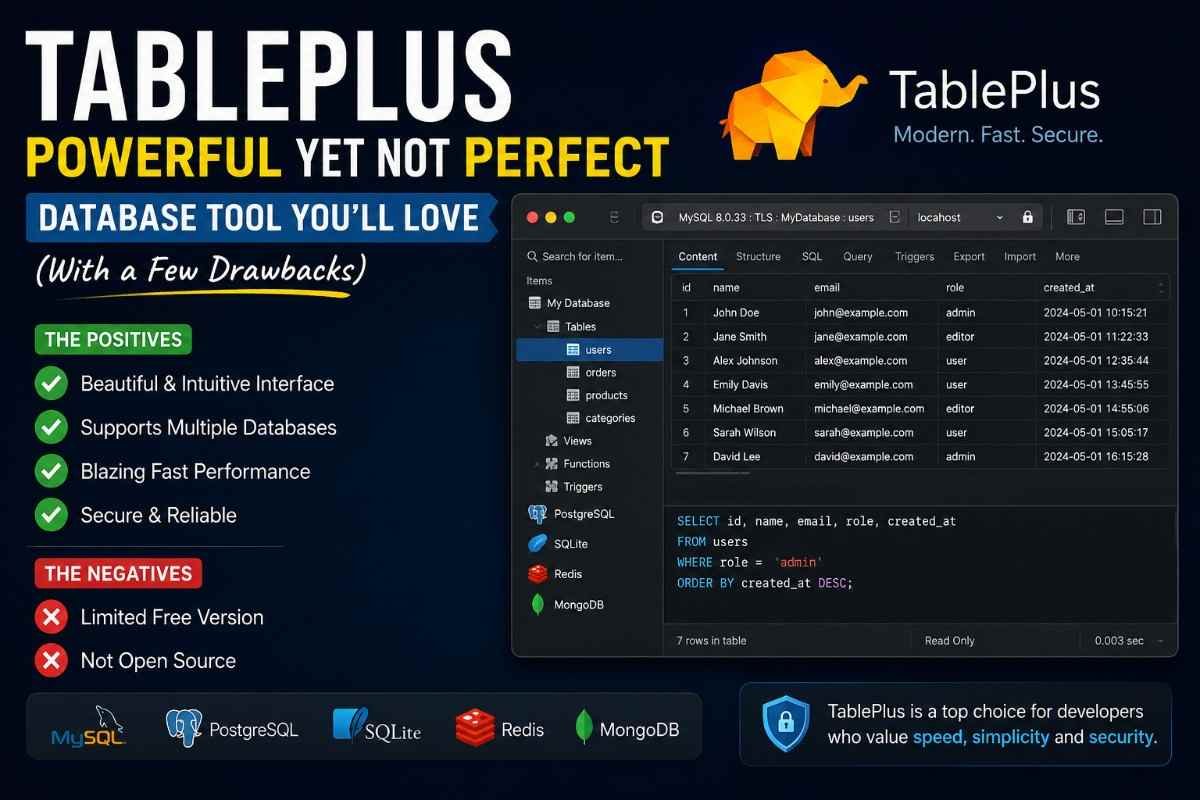
TablePlus is a modern, lightweight, and powerful database management tool designed to make working with databases fast, secure, and easy. If you’ve ever struggled with clunky database interfaces or slow query tools, TablePlus feels like a breath of fresh air. It combines simplicity with performance, giving users a clean interface without sacrificing advanced functionality. Whether you’re a beginner trying to understand databases or a seasoned developer managing complex data systems, TablePlus offers a smooth and intuitive experience.
Think of TablePlus as the “smartphone” of database tools—sleek, responsive, and designed with the user in mind. Instead of overwhelming you with confusing menus and outdated designs, it keeps things simple and efficient. You can connect to multiple databases, run queries, and manage tables all in one place. It supports both SQL and NoSQL databases, which makes it incredibly versatile. So instead of juggling multiple tools, you get everything under one roof, saving both time and effort.
Why It’s Gaining Popularity
The popularity of Table Plus has grown rapidly in recent years, and it’s not hard to see why. Developers and database administrators are constantly looking for tools that improve workflow without adding complexity. TablePlus delivers exactly that. Its lightning-fast performance and minimalistic design make it stand out from traditional tools like phpMyAdmin or MySQL Workbench.
Another reason behind its rise is its focus on user experience. Many database tools feel outdated, but TablePlus feels modern and responsive. It’s built for speed, meaning queries execute faster, and navigation feels smooth. In today’s fast-paced development environment, every second counts, and TablePlus helps users save time while staying productive. It’s not just a tool—it’s a productivity booster.
Key Features of TablePlus
User-Friendly Interface
One of the first things you’ll notice about TablePlus is its clean and intuitive interface. Unlike many traditional database tools that feel cluttered and confusing, TablePlus keeps everything organized and easy to access. You don’t need to spend hours learning how to use it. The layout is simple, with clearly labeled sections and a smooth workflow.
Imagine walking into a well-organized workspace where everything is exactly where you expect it to be—that’s the experience TablePlus provides. Whether you’re browsing tables, editing data, or running queries, everything feels natural. This ease of use makes it ideal for beginners while still being powerful enough for advanced users.
Multi-Database Support
Table Plus supports a wide range of databases, making it a versatile tool for developers and businesses. Instead of switching between different tools for different databases, you can manage everything in one place. This feature alone can significantly improve productivity.
Supported databases include:
- MySQL
- PostgreSQL
- SQLite
- Redis
- MongoDB
This multi-database support means you can handle different projects without changing tools. It’s like having a universal remote for all your database needs.
Advanced Security Features
Security is a major concern when dealing with databases, and Table Plus takes it seriously. It provides advanced security features such as encrypted connections and secure credential storage. Your sensitive data is protected, giving you peace of mind while working.
Think of it as having a digital vault for your database connections. You don’t have to worry about unauthorized access or data leaks. Table Plus ensures that your information stays safe, which is especially important for businesses handling confidential data.
Fast Performance
Speed is one of the biggest strengths of TablePlus. It’s designed to handle large datasets and complex queries without slowing down. This makes it a reliable choice for professionals who need efficiency.
Running queries feels almost instant, and navigating through data is smooth. This performance boost can save hours of work over time, especially for developers working on large-scale projects.
Supported Databases in TablePlus
SQL Databases
Table Plus fully supports popular SQL databases, making it a go-to tool for structured data management. SQL databases are widely used in applications, and TablePlus makes working with them effortless.
You can easily connect to MySQL, PostgreSQL, and SQLite databases. The tool provides a seamless experience for writing and executing SQL queries, managing tables, and analyzing data. Everything is designed to be fast and efficient, helping you focus on your work instead of struggling with the tool.
NoSQL Databases
In addition to SQL databases, Table Pluspro also supports NoSQL databases like MongoDB and Redis. This flexibility allows users to work with different types of data structures without switching tools.
NoSQL databases are often used for modern applications that require scalability and flexibility. Table Plus makes it easy to manage these databases, giving you a unified platform for all your data needs.
TablePlus vs Other Database Tools
Comparison Table
| Feature | TablePlus | MySQL Workbench | phpMyAdmin |
|---|---|---|---|
| Interface | Modern & Clean | Complex | Basic |
| Speed | Fast | Moderate | Slow |
| Multi-DB Support | Yes | Limited | No |
| Security | High | Medium | Low |
| Ease of Use | Easy | Difficult | Moderate |
Pros and Cons
Pros:
- Clean and modern interface
- Supports multiple databases
- Fast performance
- Strong security features
Cons:
- Limited free version
- Not open-source
How to Install TablePlus
Installation Steps for Mac
Installing Table Plus on Mac is straightforward and takes only a few minutes. First, download the application from the official website. Once the file is downloaded, open it and drag the TablePlus icon into your Applications folder. That’s it—you’re ready to go.
After installation, launch the app and start adding your database connections. The setup process is simple, and you’ll be up and running in no time. Even if you’re not tech-savvy, the installation process is smooth and user-friendly.
Installation Steps for Windows
For Windows users, the process is just as easy. Download the installer from the official website and run the setup file. Follow the on-screen instructions, and the installation will complete within minutes.
Once installed, open Table Plus and configure your database connections. The interface is consistent across platforms, so you’ll have the same smooth experience whether you’re using Mac or Windows.
How to Use TablePlus
Connecting to a Database
Connecting to a database in Table Plus is simple. Click on “Create a new connection,” select your database type, and enter the required credentials. Within seconds, you’ll be connected and ready to manage your data.
This process is designed to be quick and hassle-free. You don’t need to deal with complicated configurations. Everything is straightforward, allowing you to focus on your work.
Running Queries
Running queries in TablePlus is fast and efficient. The built-in SQL editor provides syntax highlighting and auto-completion, making it easier to write queries. You can execute queries instantly and view results in a clean format.
It’s like having a smart assistant that helps you write better queries. This feature is especially useful for developers who work with SQL regularly.
Managing Tables
Managing tables in TablePlus is simple and intuitive. You can create, edit, and delete tables with just a few clicks. The interface makes it easy to view and modify data without confusion.
This streamlined approach saves time and reduces errors, making database management more efficient.
Benefits of Using TablePlus
Time Efficiency
Time is one of the most valuable resources for developers, and TablePlus helps you save plenty of it. With its fast performance and simple interface, tasks that usually take hours can be completed in minutes.
Instead of struggling with slow tools, you can focus on building and improving your projects. This efficiency can make a huge difference, especially when working on tight deadlines.
Better Productivity
TablePlus boosts productivity by simplifying complex tasks. Its intuitive design and powerful features allow you to work smarter, not harder. You can manage multiple databases, run queries, and analyze data all in one place.
This means fewer interruptions and a smoother workflow. When your tools work efficiently, your productivity naturally increases.
Pricing and Plans
Free vs Paid Version
TablePlus offers both free and paid versions. The free version includes basic features but comes with some limitations, such as restricted tabs and features. It’s a good option for beginners who want to explore the tool.
The paid version unlocks all features, providing a complete experience. It’s a worthwhile investment for professionals who rely on database management tools for their work.
Common Use Cases
Developers
Developers use TablePlus to manage databases, run queries, and debug applications. Its speed and simplicity make it a favorite among developers working on web and mobile applications.
Data Analysts
Data analysts use TablePlus to analyze and manage data. The tool’s powerful features make it easy to extract insights and work with large datasets.
Tips and Tricks for TablePlus
Keyboard Shortcuts
Using keyboard shortcuts can significantly speed up your workflow. TablePlus offers various shortcuts that help you navigate and perform tasks quickly.
Query Optimization
Optimizing your queries can improve performance and efficiency. TablePlus provides tools to help you write better queries and analyze their performance.
Conclusion
TablePlus is more than just a database management tool—it’s a productivity powerhouse. With its modern interface, fast performance, and support for multiple databases, it simplifies complex tasks and makes database management enjoyable. Whether you’re a developer, data analyst, or beginner, TablePlus offers a seamless experience that can transform the way you work with data.
FAQs
1. Is TablePlus free to use?
Yes, TablePlus offers a free version with limited features. A paid version is available for full access.
2. Which databases does TablePlus support?
It supports MySQL, PostgreSQL, SQLite, Redis, MongoDB, and more.
3. Is TablePlus beginner-friendly?
Yes, its simple interface makes it easy for beginners to use.
4. Can I use TablePlus on Windows?
Yes, TablePlus is available for both Mac and Windows.
5. Is TablePlus secure?
Yes, it includes strong security features like encrypted connections.